Set up Android device ownership
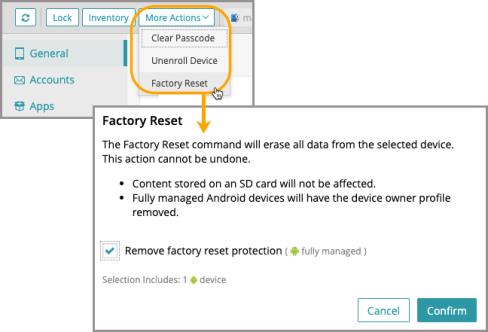
A factory reset will erase all data from the selected device(s). This action cannot be undone. As an extra security precaution, you can check 'Remove factory reset protection' to allow the device to be factory reset for reconfiguration.
- Complete the following steps in KACE Cloud:
- In the Devices section, select a device.
- In the right panel, under the More Actions dropdown, select Factory Reset.
- Complete the following steps on the device:
- Turn on device and move through any cursory screens (start, wi-fi, terms and conditions), until you are prompted for your Google Account email.
The version minimum required for afw#kace enrollment is Android 6.
- In the Email or phone field, enter afw#kace, then click Next.
- Enable or disable items in list of Googles Services, then click Next.
- On the Android Enterprise screen, click Install.
- When prompted to approve the installation, click Install.
- Once downloaded, click Set Up Device.
- Agree to Terms and Conditions.
- On the Set up work device screen, click Next.
- Consent to the privacy policy, then click OK.
- Turn on device and move through any cursory screens (start, wi-fi, terms and conditions), until you are prompted for your Google Account email.
Enroll the device
- Open the KACE Cloud app on the device.
- Click Enroll Device.
-
Grant permission to administrator by clicking Continue.
- You’ll be automatically taken to Device Settings.
- Toggle the ‘Allow permission’ setting to ON, then back out of Device Settings.
- Enter the company’s subdomain, then click Next.
If you are not prompted for your company subdomain during the enrollment process, the Google Play services on the factory default image of the device may be out of date. See Known Issues in the April Release Notes.
Assign a PIN to the device
- Sign in to the KACE Cloud Admin Portal to finalize your device enrollment.
- When the Device Enrolled message appears, click Set Passcode.
- Click PIN.
- Enter a 4-digit PIN number, then click Continue.
- Re-enter PIN number, then click OK.
The device is now ready to be assigned to a user.
Manage device ownership
After activating Android device ownership, the device can be managed using KACE Cloud.
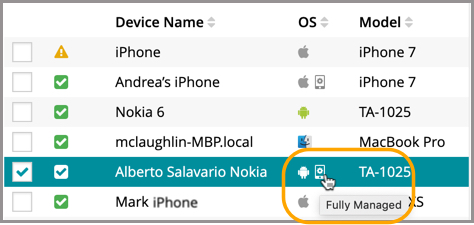
In the devices section, a fully managed device is identifiable by the device icon next to the Android OS icon.
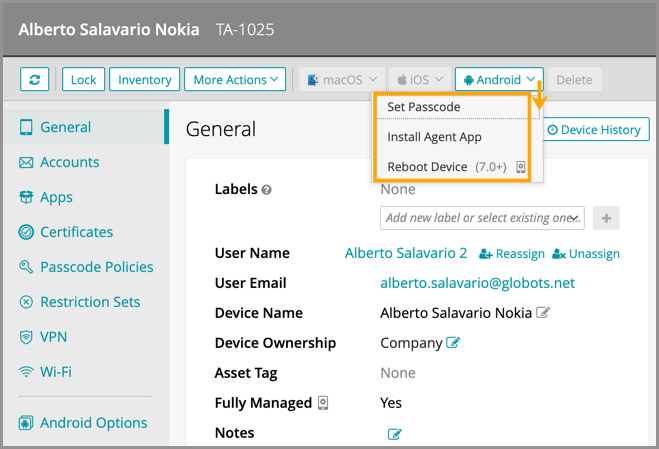
In the right panel, click the Android dropdown to see all available actions for Android devices.